
🔋 Why Your Battery Drains Fast and How to Fix It
Trusted Battery Replacements in Birmingham - Expert Solutions for Fast Battery Drain
Published: January 2025 | Reading Time: 8 minutes | Author: Birmingham Phone Repair Experts
📋 Table of Contents
Is your phone battery draining faster than ever? You're not alone. Battery drain is one of the most common issues smartphone users face, and it can be incredibly frustrating when your device dies halfway through the day. Whether you're using an iPhone, Samsung Galaxy, or any other smartphone, understanding why your battery drains quickly and knowing how to fix it can save you time, money, and endless frustration.
In this comprehensive guide, we'll explore the most common causes of rapid battery drain, provide immediate solutions you can implement today, and help you understand when it's time to seek professional battery replacement services in Birmingham.
🚨 Quick Fix Alert!
If your battery is draining extremely fast (losing 50%+ charge in just a few hours), this could indicate a failing battery that needs immediate replacement. Don't wait – contact our Birmingham experts for same-day battery replacement services.
🔍 Common Causes of Fast Battery Drain
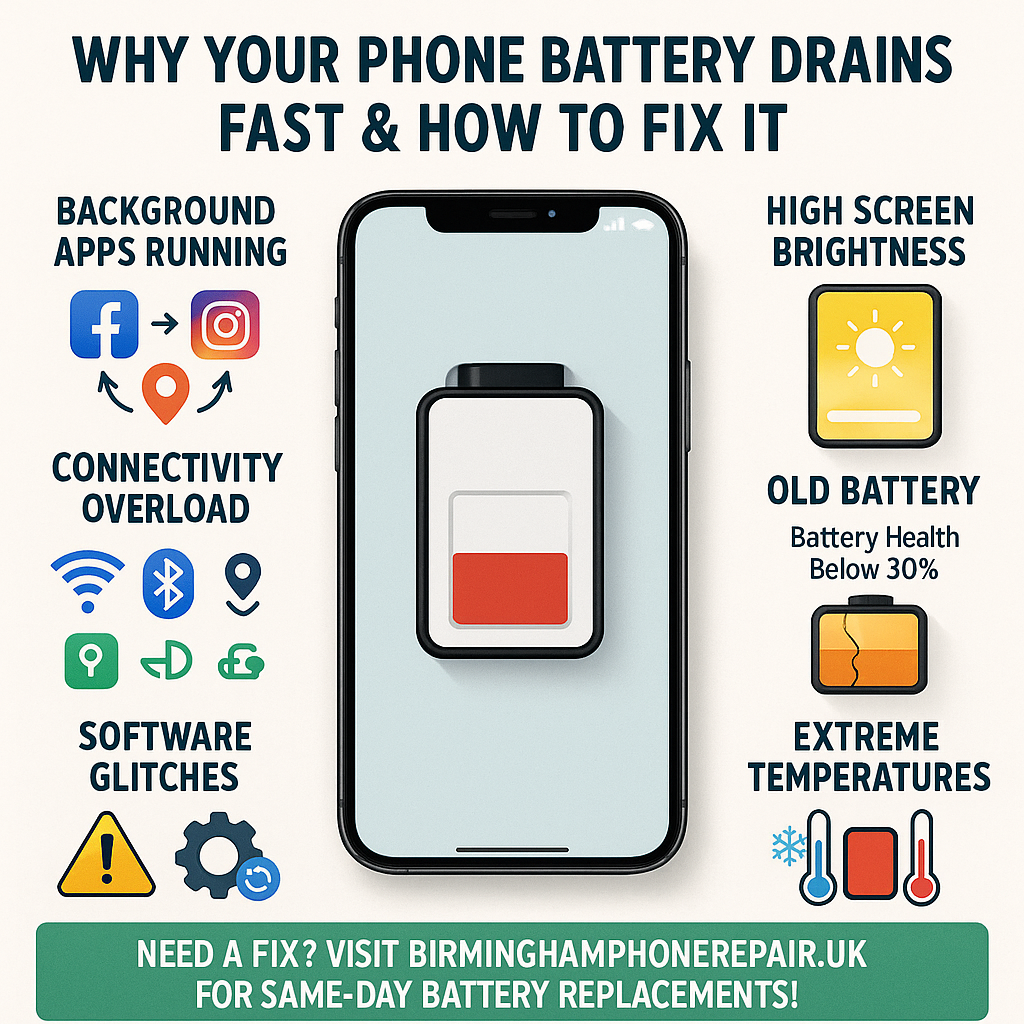
1. Background App Activity
One of the biggest culprits behind fast battery drain is background app activity. Many apps continue running even when you're not actively using them, consuming precious battery life. Social media apps, streaming services, and location-based apps are particularly notorious for this behavior.
According to Apple's battery research, background app refresh can account for up to 30% of your daily battery usage. This constant activity not only drains your battery but also generates heat, which can further degrade battery performance over time.
2. Screen Brightness and Display Settings
Your phone's display is typically the largest consumer of battery power. High brightness settings, especially when combined with features like always-on displays, can significantly reduce battery life. Modern smartphones have increasingly larger and more vibrant displays, which, while providing better user experience, consume more power.
3. Connectivity Features
Wi-Fi, Bluetooth, cellular data, and GPS all consume battery power, especially when your phone is constantly searching for signals or maintaining connections. Poor cellular reception can cause your phone to work harder to maintain a connection, leading to faster battery drain.
4. Battery Age and Degradation
Lithium-ion batteries naturally degrade over time. After approximately 500-800 charge cycles (typically 2-3 years of regular use), a battery's capacity can decrease by 20% or more. This degradation is a natural chemical process that occurs regardless of how well you care for your device.
💡 Pro Tip:
You can check your iPhone's battery health by going to Settings > Battery > Battery Health & Charging. For Android devices, you can use third-party apps like AccuBattery or check built-in battery statistics in your device settings.
5. Software Issues and Updates
Outdated software, buggy apps, or recent system updates can sometimes cause abnormal battery drain. New iOS or Android updates occasionally introduce bugs that affect battery performance, though these are usually fixed in subsequent updates.
6. Environmental Factors
Extreme temperatures, both hot and cold, can significantly impact battery performance. Samsung's official documentation indicates that batteries perform optimally between 16°C to 22°C (60°F to 72°F).
⚡ Immediate Solutions You Can Try
1. Optimize Your Settings
- Reduce Screen Brightness: Lower your screen brightness or enable auto-brightness to adjust based on ambient light conditions.
- Enable Dark Mode: On phones with OLED displays, dark mode can significantly reduce battery consumption.
- Turn Off Location Services: Disable location services for apps that don't need them, or set them to "While Using App" instead of "Always."
- Disable Background App Refresh: Turn off background refresh for apps you don't need to update constantly.
2. Manage Your Apps
Identify and close battery-draining apps. Both iOS and Android provide detailed battery usage statistics that show which apps consume the most power. Consider uninstalling or replacing apps that consistently drain your battery.
3. Update Your Software
Ensure your phone's operating system and apps are up to date. Updates often include battery optimization improvements and bug fixes that can resolve drain issues.
4. Use Power-Saving Modes
Both iOS and Android offer power-saving modes that can extend battery life by reducing performance and limiting background activities. While these modes may slightly reduce functionality, they can be lifesavers when you need your phone to last longer.
⚠️ Important Note:
If these solutions don't significantly improve your battery life, or if your phone still drains quickly even with minimal usage, it's likely time for a professional battery replacement.
🔧 When You Need Battery Replacement
Recognizing when your battery needs replacement is crucial for maintaining your device's performance and your daily productivity. Here are the key indicators:
Signs Your Battery Needs Replacement:
- Rapid Discharge: Your phone loses 50% or more of its charge within a few hours of normal use.
- Unexpected Shutdowns: Your phone turns off suddenly, even when the battery indicator shows remaining charge.
- Slow Charging: Your phone takes significantly longer to charge than when it was new.
- Battery Swelling: The battery appears swollen or the phone case doesn't fit properly (this requires immediate attention).
- Overheating: Your phone gets unusually hot during normal use or charging.
- Poor Battery Health: iPhone users can check Settings > Battery > Battery Health; anything below 80% typically indicates replacement is needed.
The Android support documentation suggests that batteries should be replaced when they can no longer hold at least 80% of their original capacity.
Professional vs. DIY Replacement
While DIY battery replacement kits are available, we strongly recommend professional replacement for several reasons:
- Safety: Lithium-ion batteries can be dangerous if mishandled
- Warranty: Professional replacement often comes with warranties
- Quality: Certified technicians use genuine or high-quality replacement parts
- Tools: Professional repair requires specialized tools and expertise
🏢 Professional Battery Replacement Services in Birmingham
When it comes to battery replacement in Birmingham, you need a service that's reliable, fast, and uses quality parts. Birmingham Phone Repair offers comprehensive battery replacement services with several convenient options:
Walk-In Service
Visit our Birmingham location for same-day battery replacement. Most repairs completed within 30-60 minutes.
Call-Out Service
We come to you! Our mobile repair technicians can replace your battery at your home or office across Birmingham.
Postal Service
Nationwide postal repair service with secure packaging and fast turnaround times.
Why Choose Birmingham Phone Repair?
- Certified Technicians: Our team has years of experience with all major phone brands
- Quality Parts: We use only genuine or premium aftermarket batteries
- Fast Service: Most battery replacements completed within an hour
- Warranty: All our battery replacements come with comprehensive warranties
- Competitive Pricing: Fair, transparent pricing with no hidden fees
Our services cover all major smartphone brands including iPhone, Samsung, Google Pixel, OnePlus, Huawei, and more. We also provide screen repairs, water damage restoration, and other comprehensive phone repair services.
⭐ Customer Reviews & Testimonials
Don't just take our word for it – see what our customers say about our battery replacement services:
Trustpilot Reviews
"Excellent service! My iPhone battery was replaced in 30 minutes. The team was professional and the price was very reasonable. Highly recommend!"
Read More Reviews on TrustpilotGoogle Reviews
"Fast, efficient, and affordable. My Samsung Galaxy battery was dying by lunchtime, but after the replacement, it lasts all day again. Great service!"
View Google ReviewsFacebook Reviews
"The call-out service was perfect – they came to my office and replaced my phone battery while I worked. Very convenient and professional service."
Check Facebook ReviewsYelp Reviews
"Honest, transparent pricing and excellent workmanship. My phone's battery life is better than when I first bought it. Will definitely use again!"
Read Yelp Reviews🛡️ Prevention Tips for Better Battery Life
While battery replacement is sometimes inevitable, following these best practices can help extend your battery's lifespan and maintain optimal performance:
Charging Best Practices
- Avoid Extreme Charge Levels: Try to keep your battery between 20-80% charge when possible
- Use Original Chargers: Always use manufacturer-approved chargers and cables
- Avoid Overnight Charging: While modern phones have protections, avoiding overnight charging can reduce battery stress
- Remove Cases While Charging: Prevent overheating by removing thick cases during charging
Usage Habits
- Regular Software Updates: Keep your phone's software updated for optimal battery management
- Temperature Management: Avoid exposing your phone to extreme temperatures
- Periodic Restarts: Restart your phone weekly to clear memory and reduce background processes
- Monitor Battery Usage: Regularly check which apps consume the most battery and adjust accordingly
When to Seek Professional Help
If you've tried all the optimization techniques and your battery still drains quickly, it's time to consult professionals. The team at Birmingham Phone Repair can diagnose whether your issue is software-related or if you need a battery replacement.
💡 Expert Advice:
Many customers ask about battery calibration. While some sources suggest completely draining and then fully charging your battery, this is actually unnecessary for modern lithium-ion batteries and can potentially harm them. Instead, focus on the charging best practices mentioned above.
🔋 Understanding Battery Technology
To better understand why batteries fail and how to maintain them, it's helpful to understand the technology behind them. Most smartphones use lithium-ion batteries, which offer several advantages over older battery technologies:
Advantages of Lithium-Ion Batteries:
- High Energy Density: More power storage in a smaller, lighter package
- No Memory Effect: Unlike older batteries, they don't need to be fully discharged before recharging
- Low Self-Discharge: They hold their charge well when not in use
- Fast Charging Capable: Can handle rapid charging with proper management
Why Batteries Degrade:
Battery degradation occurs due to chemical reactions within the battery cells. According to research from Nature Energy, several factors contribute to this degradation:
- Charge Cycles: Each charge and discharge cycle slightly reduces capacity
- Heat: High temperatures accelerate chemical reactions and degradation
- Time: Even unused batteries degrade over time
- Deep Discharges: Completely draining the battery can damage cells
📱 Device-Specific Battery Tips
iPhone Users
iPhone users have access to several built-in battery optimization features:
- Optimized Battery Charging: iOS learns your charging routine and delays charging past 80% until you need it
- Battery Health: Check Settings > Battery > Battery Health & Charging for detailed information
- Low Power Mode: Reduces background activity and performance to extend battery life
Android Users
Android devices offer various battery management features:
- Adaptive Battery: Uses machine learning to prioritize power for your most-used apps
- Battery Saver: Limits background activity and reduces performance
- App Standby: Puts unused apps into a deep sleep state
For comprehensive device support and battery replacement services, visit our Birmingham Phone Repair website or contact us directly.
💰 Cost-Effective Battery Solutions
Battery replacement is often more cost-effective than purchasing a new phone. Here's why choosing professional battery replacement makes financial sense:
Cost Comparison:
- New Phone: £300-£1,200+ depending on model and features
- Professional Battery Replacement: £40-£150 depending on device
- Extended Device Life: 2-3 additional years of use
Additional Benefits:
- Environmental Impact: Reduces electronic waste by extending device lifespan
- Data Security: No need to transfer data or worry about data loss
- Familiar Interface: Keep using the phone you know and love
- Accessories: Continue using your existing cases, chargers, and accessories
🎯 Special Offer
Contact Birmingham Phone Repair today for a free battery diagnostic and quote. We offer competitive pricing and same-day service for most battery replacements. Don't let a dying battery slow you down!
📞 Get Your Battery Replaced Today
Don't let a failing battery disrupt your life. Contact Birmingham Phone Repair for fast, reliable battery replacement services.